
When an app needs a backend and an admin panel
 Mykola Tabuchenko
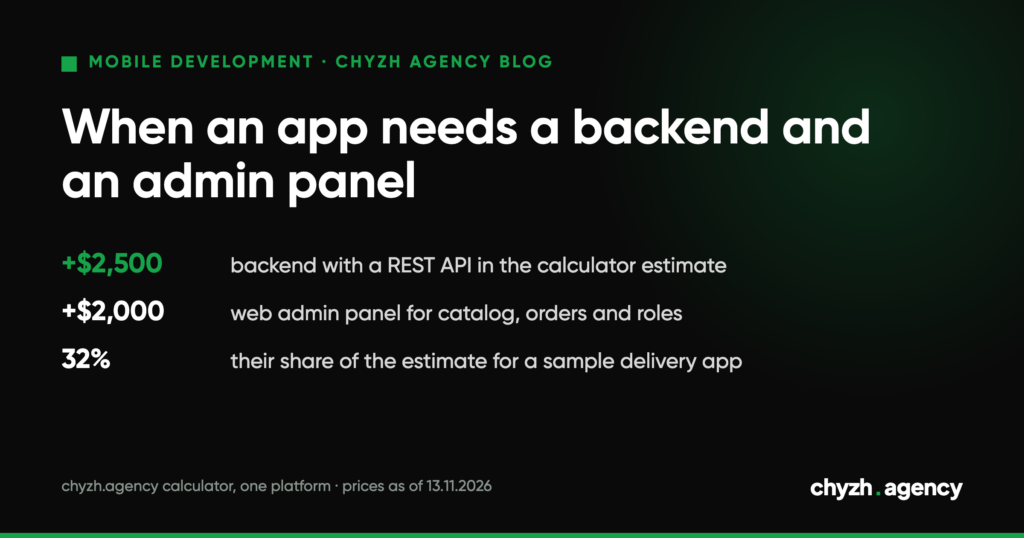
Short answer. You need your own backend when data has to live beyond a single phone: accounts, orders, payments, a catalog that changes, push notifications triggered by events. You need an admin panel when someone on your team changes that data without a developer: prices, order statuses, users. If the business already runs a website, CRM or accounting system with an API, the app can work with it and you won’t have to write a server of your own.
In our cost calculator, the “Backend + REST API” option adds $2,500 to the estimate and “Admin panel (web)” another $2,000 (prices on the page as of 13 November 2026). Below are a feature table, a sample data schema and a roles table you can use as the basis of a requirements document.
Which features need a server
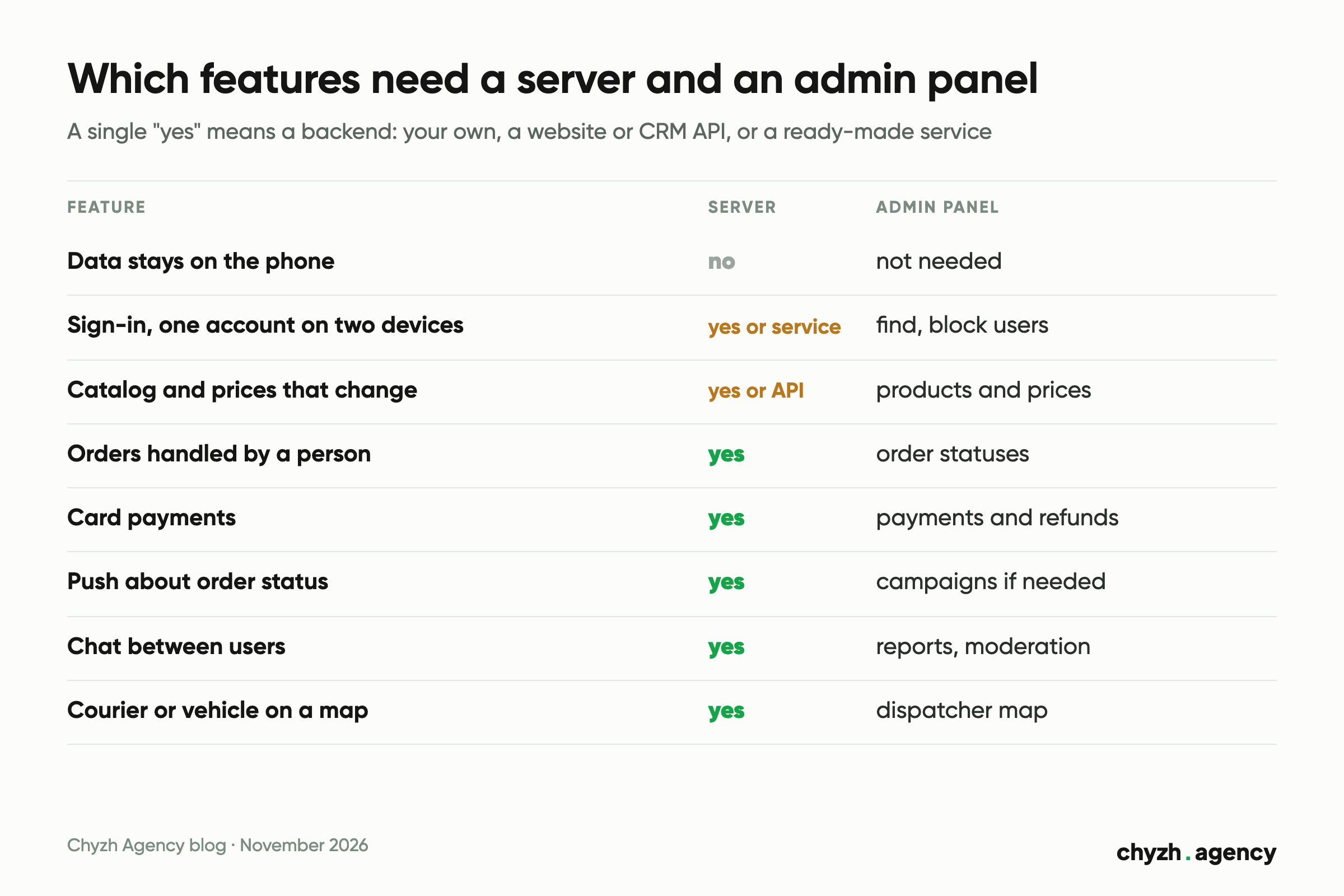
The decision depends on features. Go through the list and mark yours.
| Feature | Server needed? | What the admin panel does |
|---|---|---|
| Data stays on the phone: notes, a converter, a reference guide with no updates | no | not needed |
| Sign-in by phone or email, same account on two devices | yes, or a ready-made sign-in service | find and block users |
| Catalog, prices and promotions that change | yes, or the existing website’s API | edit products and prices |
| Orders or bookings that a person handles | yes | order list, status changes |
| Card payments | yes | view payments and refunds |
| Push notifications about order status | yes | campaigns, if you need them |
| Chat between users | yes | reports and moderation |
| Live location of a courier or vehicle | yes | map for the dispatcher |
Two rows need a word of explanation. A payment is signed with the payment provider’s secret key, and that key can’t be stored in the app: someone will extract it from the build. So the server confirms payments. Push notifications work the same way. According to the Firebase Cloud Messaging documentation (updated 12 November 2026), the server side of notifications consists of Google’s infrastructure plus your app server or another trusted environment that securely stores access credentials and device tokens.
Our portfolio has an example of the last row. BeM2M, which we built for Benish GPS, is a vehicle telemetry system. According to the case page, it works with a large number of GPS devices, trackers and sensors, and an analytics module processes current and historical data. There’s no way to run that without a backend.
When an existing API or a ready-made service is enough
The business already has a backend. A website, online store, CRM or accounting system with an API already stores products, customers and orders. The app becomes one more client of that API, and the admin panel stays the one your team already uses.
That was the case with an agro-sector app built on the client’s existing backend. According to the UkrAvit case page, the backend was already in place; we built the app in Flutter for Android and iOS and synchronized the design with the backend’s functionality. The crop protection catalog opens without internet access and updates as soon as a connection appears, because farmers often work in the field.
Before relying on someone else’s API, find out:
- whether there’s documentation and a test environment, so development doesn’t touch live data;
- whether the API returns everything the screens need: filters, paginated lists, stock levels;
- how the app gets access to the API and who issues the keys;
- who changes the API and how long it takes if the app is missing a field;
- where device tokens for push notifications will be stored, since a website usually doesn’t need them.
One or two roles, no payments. Ready-made services (known as BaaS) give you sign-in, a database, file storage and push notifications without a server of your own. As of 13 November 2026, the free Supabase plan covers up to 50,000 monthly active users, a 500 MB database and 1 GB of file storage. On the free Firebase plan (Spark), the Firestore database holds 1 GiB with limits of 50K reads and 20K writes per day; email and social sign-in are included too.
The limits aren’t obvious at first. Phone sign-in via SMS isn’t available on Spark, and on the paid Blaze plan every SMS is billed separately. Your own logic (discounts, status changes, payment checks) goes into Cloud Functions in Firebase, which Spark doesn’t include either; on Blaze the first 2 million invocations a month are free. Firebase access rules are written in its own language, so moving to your own server means rewriting them.
A free Supabase project is paused after one week of inactivity. For an MVP that was shown to investors and then left alone for a week, that means the app won’t load any data at the next meeting.
If your plans include staff with different permissions, payments or data exchange with an accounting system, ask your contractor before launch where that logic will live and what moving to your own server would cost.
No server at all. A calculator, an offline reference guide that updates along with the app, local notes. Analytics and crash reports come from free services such as Crashlytics.
A hypothetical example: data schema for a delivery app
This example is hypothetical, not a client. Drinking water delivery in one city. The customer orders in the app and pays by card, the courier sees their own orders, the manager runs the catalog and statuses, the owner looks at the report. There’s no website, CRM or accounting system, so both a server and an admin panel are needed.
| Entity | Main fields | Who creates and changes it |
|---|---|---|
| User | name, phone, role, sign-up date, deletion request date | signs up on their own; the owner assigns the role |
| Address | user, address, coordinates, note for the courier | customer |
| Product | name, volume, price, photo, in stock | manager |
| Order | customer, address, delivery time, total, status, courier | the customer creates it; the manager and courier change the status |
| Order line | order, product, quantity, price at the time of order | the system at checkout |
| Payment | order, amount, status, transaction ID at the payment provider | the server, based on the provider’s response |
| Device | user, push token, platform | the app at sign-in |
| Status history | order, old and new status, who changed it, when | the system |
These fields are the ones people tend to forget.
The price in an order line is stored separately from the product price. Otherwise the manager raises a price in the admin panel and the totals change in every old order and report.
Status history answers the question “who cancelled the order?” when a customer complains. Without it, the admin panel only shows the current status.
The deletion request date is there because of app store requirements (covered below). Which data to keep after deletion for legal reasons is up to your lawyer: the Google Play help page explicitly advises checking this.
Who sees and changes what
It’s better to write out the roles before the estimate. They determine how many screens the admin panel has and how many checks the server runs.
| Data | Customer | Courier | Manager | Owner |
|---|---|---|---|---|
| Catalog and prices | sees | no | changes | changes |
| Orders | own, cancels before confirmation | assigned to them, marks “delivered” | all, changes status and courier | all, sees |
| Customer address and phone | own, changes | only in an assigned order | sees | sees |
| Payments | own | no | sees status | sees, issues refunds |
| Users and roles | no | no | sees customers | changes roles, blocks |
| Report for a period | no | no | no | sees |
| Account deletion | own, in the app | no | no | on request from the web form |
The server checks permissions. If you simply hide the “Change price” button in the courier’s interface, an API request with the courier’s token will still go through. That’s why the roles table in the requirements becomes the list of checks for the backend.
What the first version of the admin panel should do
For the example above:
- products: add, change the price, hide from the catalog;
- orders: a list filtered by status and date, status changes, courier assignment;
- users: search by phone, block, delete on request;
- staff: add a manager or courier and assign a role;
- export of orders for a period to a spreadsheet.
Charts, promo codes, campaigns and a banner editor can wait. For the first months, a spreadsheet export covers reporting.
The Flagman case shows what load an admin panel takes. Flagman is an app for a fishing tackle store. The case page describes an administrator who takes orders and replies to messages and states 3,000+ orders a month, which is about a hundred a day. At that volume, a status filter and quick status changes matter more than any chart.
Before the estimate, ask your contractor whether a ready-made panel can serve as the base for your admin panel and what would need to be added for your roles.
App store rules that land on the backend
The rules of both stores affect the backend directly:
- App Store, guideline 5.1.1(v) of the App Review Guidelines (updated 16 October 2026): if the app supports account creation, it must also offer account deletion within the app.
- Google Play, the account deletion requirement: under the same condition, you need an in-app path to delete the account and associated data, plus a web link where users can request deletion. Answers about data deletion go into the Data safety form in Play Console.
- App Store, guideline 2.1(a): for an app with sign-in, you must give reviewers a demo account and keep the backend turned on during review.
So the requirements get account deletion together with the data on the server, a simple web page for deletion requests, and a stable test environment with a demo account during review. Adding them after a store rejection takes longer than planning them from the start.
How a backend and an admin panel change the estimate
The search queries that bring people to our app development pages don’t mention a backend at all. From 13 May to 11 November 2026, Search Console showed 827 visible queries and 52,775 impressions from them on the 18 pages of our mobile development section (service, calculator, iOS, Android, Flutter, design; Search Console hides some queries); not one query contains “backend”, “server”, “admin panel” or “API” in any of our three languages. People ask what an app costs and name scenarios: an app for an online store (44 impressions for Ukrainian and Russian queries) or for a taxi service (16 impressions). They don’t ask about the backend, even though it weighs more than almost anything else in the estimate, as the calculation below shows.
The calculator works like this: a $3,000 base plus the price of each selected option, with the platform coefficient multiplying the sum of the options. For the hypothetical example we picked a medium size (10–25 screens), sign-in, push notifications, geolocation with maps, a catalog with filters, a cart and online payment.
| Option set | One platform | iOS and Android in Flutter (×1.7) |
|---|---|---|
| App on an existing API, no server of its own | $9,500 | $14,050 |
| + Backend + REST API ($2,500) | $12,000 | $18,300 |
| + Admin panel (web) ($2,000) | $14,000 | $21,700 |
| + Warehouse / CRM integration ($1,000) | $15,000 | $23,400 |
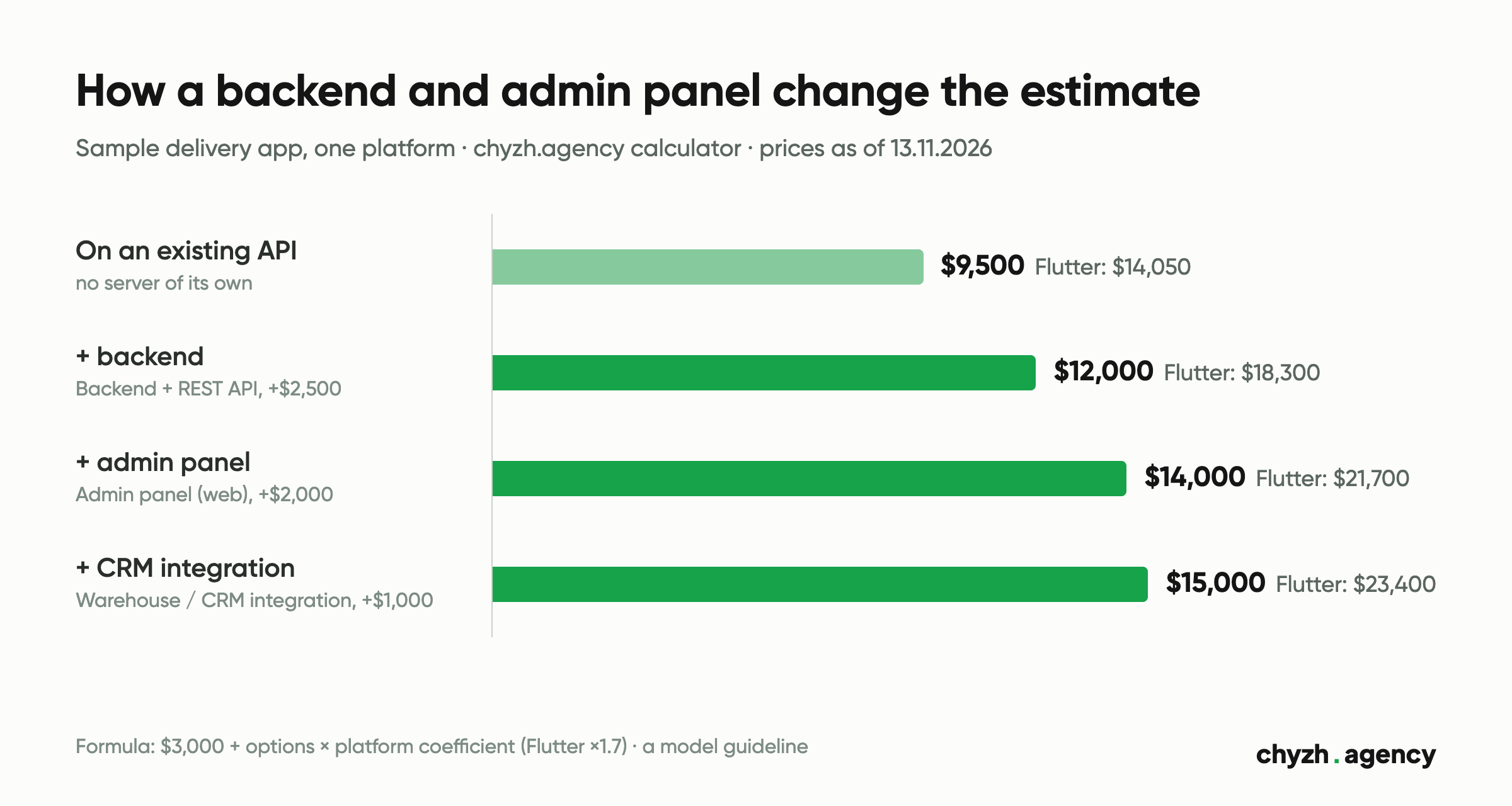
The server and admin panel make up a third of the estimate: $4,500 out of $14,000 on one platform. The platform coefficient in the calculator multiplies every option, the backend included, so in Flutter these two lines add $7,650. If one server serves both apps, ask your contractor whether your quote multiplies it by the coefficient.
These numbers are a guideline from our model. We fix the exact amount in a commercial proposal after discovery (free, 30 minutes). The calculator also warns that it doesn’t account for complex integrations with legacy systems, regulatory requirements, loads above 100K monthly active users or hardware devices. After launch, monthly costs appear: according to the same page, hosting and the backend cost $20 to $200 a month depending on load.
What to prepare for an estimate
- “server needed” marks in the feature table above;
- a data schema for your scenario: take the hypothetical example and swap the entities;
- a roles table: which of your people will work in the admin panel and what they’re allowed to do;
- a list of the systems you already have (website, CRM, accounting) and whether they have a documented API;
- a decision on whose name the hosting, the Firebase or Supabase account and the payment service are registered under. Your company’s, from day one, is the better choice.
These tables go into the mobile app requirements document, and with them it’s easier to account for integrations in the estimate in our calculator. You see the code in GitHub from day one, and the rights to it pass to you once the final milestone is paid. The rest of what the work includes is on the mobile app development page.
Author: Mykola Tabuchenko, Senior Mobile Developer. Reviewed by: Serhii Kolodynskyi, Head of App Development.
Sources: chyzh.agency app development cost calculator, option prices and formula from the page HTML, 13 November 2026; UkrAvit, Flagman and BeM2M case pages on chyzh.agency, 13 November 2026; Google Search Console for chyzh.agency, 13 May to 11 November 2026, queries for the 18 mobile development pages; App Review Guidelines, Apple, updated 16 October 2026, guidelines 2.1(a) and 5.1.1(v); Understanding Google Play’s app account deletion requirements, Play Console Help, viewed 13 November 2026; Your server environment and FCM, Firebase, updated 12 November 2026; Firebase Pricing and Supabase Pricing, 13 November 2026.
Related articles
A checklist for accepting a test build: 5 test devices by market share, sandbox payments,...
By our calculator model, the same app costs $17,450 or $27,650 depending on what the...
What the client writes and what the team adds: roles, scenarios, integrations, acceptance criteria. A...