
What goes into a mobile app requirements document
 Serhii Kolodynskyi
Short answer. A mobile app requirements document describes roles (who uses the app), scenarios (what those people do), integrations (which systems the app exchanges data with), acceptance criteria (how you decide the work is done) and open questions (what is still undecided). The client writes the business part: the goal, the users, what they do in plain words, the systems already in place and the constraints. During discovery the team turns that into user stories, a screen list, the architecture, measurable criteria and an estimate.
You don’t need a 40-page document to start. Two pages from the client are enough for a first price range, and the team writes the full spec together with you. Our “Discovery + spec” stage takes 2–3 weeks and design another 3–5 weeks; those are the timings for a full product. For an MVP both stages run in a short cycle so the app reaches the App Store and Google Play in one month (as stated on our service page on 13 November 2026).
Below is a template you can copy and fill in, with a hypothetical example in every section, plus a scope checklist taken from our cost calculator.
Brief, spec for an estimate, spec for a contract
People use the word “spec” for three different documents. Mixing them up costs weeks: the client expects a fixed price for a one-page brief, and the team can’t give one.
| Document | Who writes it | What’s in it | What you get |
|---|---|---|---|
| Brief | client | goal, users, main scenarios, time and budget constraints | a price range and a few scope options |
| Spec for an estimate | client, refined by the team | roles, features, integrations, platforms | an estimate broken down by feature |
| Spec for a contract | team after discovery, approved by the client | user stories, screens, architecture, acceptance criteria, milestones | timeline and budget in a roadmap, acceptance points |
Our free 30-minute call works from a brief: after it we outline three scope options at different budgets. We fix the timeline in a roadmap after discovery. Before that stage starts, agree whether “Discovery + spec” is billed separately and whether the finished spec stays with you if you go on with another team.
What the client writes and what the team adds
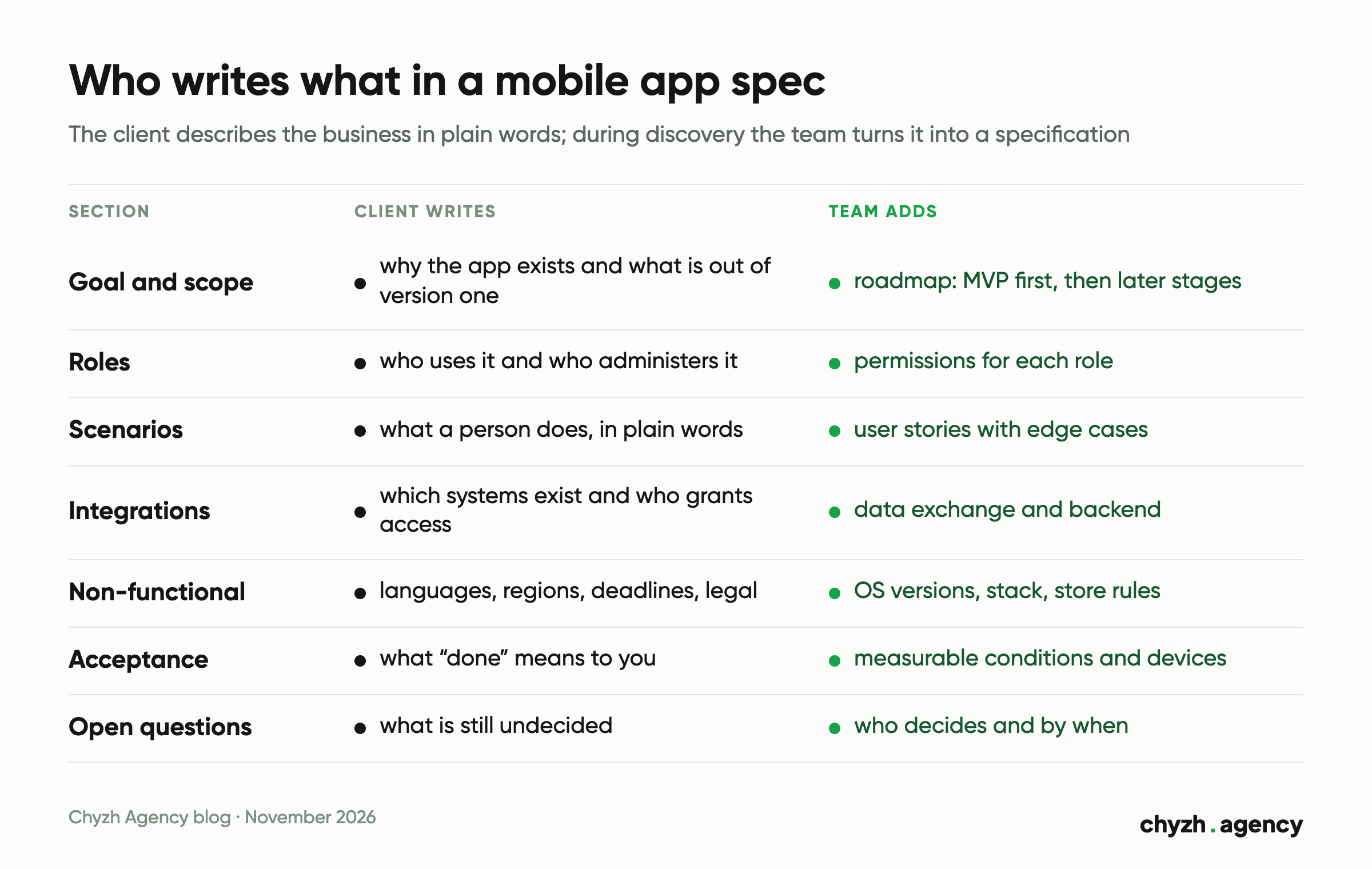
You know the business and your customers. The team knows how it will work on a phone and what fits the budget. Leave the architecture and the database choice to the team: they will be the ones answering for it in the code.
| Spec section | Client writes | Team adds during discovery |
|---|---|---|
| Goal and scope | why the app exists, which business metric, what is definitely out of version one | roadmap: what goes into the MVP and what comes later |
| Roles | who uses the app and who administers it | permissions for each role: what they see and what they can change |
| Scenarios | what a person does, in plain words | user stories with edge cases: no connection, cancellation, failed payment |
| Integrations | which systems already exist, contracts with the payment provider and CRM, who grants access | how data is exchanged and what we build on our own backend |
| Non-functional requirements | languages, regions, deadlines, legal requirements | OS versions, stack, security, app store requirements |
| Acceptance criteria | what “done” means to you | measurable conditions and the list of test devices |
| Open questions | what you haven’t decided yet | what came up during analysis, who decides and by when |
A scenario in plain words is more useful than a home-made specification. The team can break “a customer sees free spots in a class and books in under a minute” into screens, states and edge cases. A database field table drawn up by the client still has to be checked line by line.
A spec template with a worked example
The example is hypothetical and describes no real client: an app for booking group classes at a chain of three fitness studios. Fill in the empty sections of your own spec the same way.
1. Goal and scope of version one
Written by the client: one or two sentences on the goal, one metric, and a list of what version one leaves out.
Hypothetical example: “Customers book classes without calling the front desk. Metric: the share of bookings made in the app over the first three months. Version one leaves out the sports nutrition shop and the loyalty program.”
2. Roles
Written by the client; the team refines each role’s permissions.
- Customer: views the schedule, books, cancels a booking, buys a membership.
- Trainer: sees who has booked their class, marks attendance.
- Studio administrator: edits the schedule, cancels classes, sees payments. Works in a web panel; this role has no access in the app.
3. User scenarios
The client describes the action and the result. The team adds edge cases and turns each scenario into user stories.
| Scenario | What the person does | What should happen | Edge cases (added by the team) |
|---|---|---|---|
| Booking | customer picks a studio, a date and a class | the spot is reserved, a confirmation arrives | class is full; membership has expired |
| Class cancelled | administrator cancels a class | booked customers get a push, the class goes back onto the membership | customer has notifications turned off |
| Payment | customer buys a membership in the app | membership is active right after payment | payment declined; connection dropped mid-payment |
4. Integrations
The client lists the systems and says who grants access. The team describes the data exchange.
- Online payments: the client signs the contract with the payment provider and hands the team test keys.
- Schedule: currently kept in a Google Sheets table; in version one it moves into the admin web panel.
- Push notifications and analytics: set up by the team.
- CRM: none yet; the decision sits in the open questions section.
5. Acceptance criteria
We write these together, and each one must be checkable on a test build. The values below are for the example; your spec will have its own.
- A customer with an active membership books a class in no more than 4 taps from the home screen.
- After a class is cancelled, everyone booked gets a push within 5 minutes.
- After a successful payment the membership shows in the profile without restarting the app.
- All of the above works on the devices from the list agreed during discovery.
6. Open questions
Every question has an owner and a date. While a question is open, the estimate stays a range, so close them before the contract. The amounts in the last column come from our calculator; the calculation is below.
| Question | Who decides | By when | Effect on the estimate |
|---|---|---|---|
| Do customers need a chat with the trainer? | client | end of discovery | +$2,550 on Flutter |
| Should the schedule work offline? | client with the team | end of discovery | +$2,550 on Flutter |
| One platform or both, and built with what? | client with the team | first call | $14,000, $21,700 or $25,000 |
How to choose between Flutter and native development is covered separately: cross-platform vs native development.
Scope of work: the calculator as a 37-item checklist
People who reach our app development pages from search ask about price. We looked at Google Search Console queries from 13 May to 11 November 2026 for 18 pages on this topic in three languages (service, calculator, iOS, Android, Flutter, design): 63,725 impressions across all 18 pages. GSC shows 827 queries explicitly (52,775 impressions from visible queries), and 346 of them contain “price”, “cost”, “how much”, “calculator” or their Ukrainian and Russian equivalents. That is 50.6% of the impressions from visible queries. Not one query contains “spec”, “requirements”, “technical assignment” or “brief”; one mentions a prototype (a Russian-language query on the cost of an app prototype, 5 impressions).
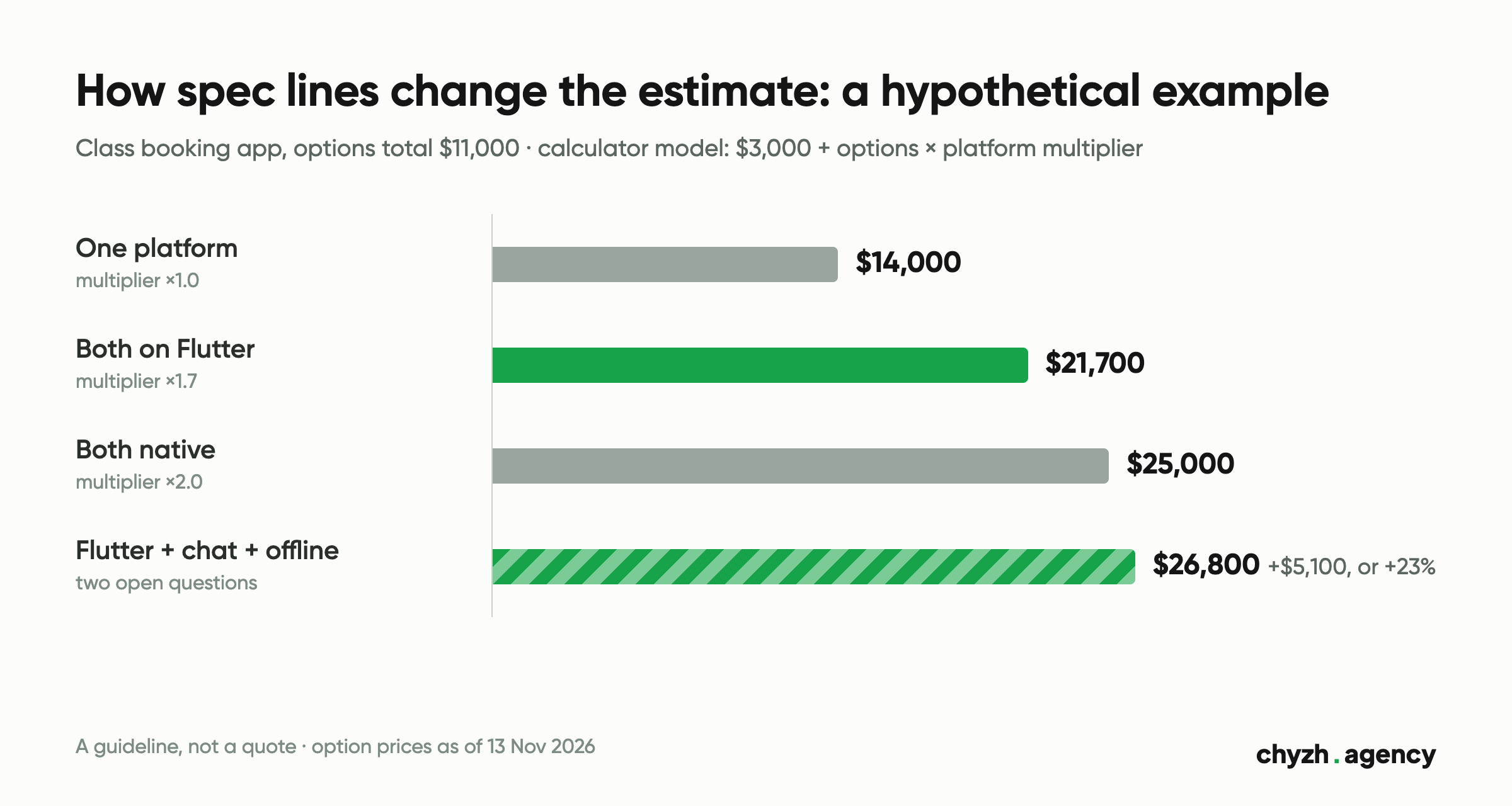
You can’t price something without a scope. So we built the scope checklist from our own app cost calculator: it has 7 steps and 37 options, and each option is a line in the spec that changes the estimate. The model is simple. Base development costs $3,000, the price of each selected option is added, and the platform multiplies the options total: one platform ×1.0, both on Flutter ×1.7, native iOS and Android ×2.0. The calculator’s result runs from $3,000 to $74,000. It is a guideline for the conversation; we give an exact estimate after discovery.
| Calculator step | What to decide in the spec | Options and price (as of 13 Nov 2026) |
|---|---|---|
| Device type | phone, tablet or both | “Smartphone” included; “Tablet” +$500; “Smartphone + tablet” +$1,000 |
| Platform | iOS, Android or both, and built with what | “iOS only” and “Android only” ×1.0; “iOS + Android · Flutter (one codebase)” ×1.7; “iOS + Android · Native (two teams)” ×2.0 |
| App size | how many screens | Small (up to 10 screens, MVP) included; Medium (10–25 screens) +$2,000; Large (25–50 screens) +$4,000 |
| Design level | template, your own style or a design system | Basic (template UI) included; Custom (to match your brand) +$2,000; Premium (full design system) +$5,000 |
| App features | what the app does | “Authorization (email / social networks)”, “Push notifications”, “Geolocation + maps”, “File / photo upload” +$500 each; “Multilingual (3+ languages)”, “AR / camera work”, “Voice input / speech-to-text” +$1,000 each; “Chat / messenger”, “Offline mode + synchronization”, “Photo / image recognition”, “Personal recommendations (ML)” +$1,500 each; “AI chat / assistant (GPT)” +$2,000 |
| E-commerce and sales | does the app sell | “Cart + checkout”, “Online payment (Stripe / Liqpay / Fondy)”, “Catalog + filters”, “Warehouse / CRM integration” +$1,000 each; “Reviews + ratings”, “Loyalty program” +$500 each |
| Add-ons | what the app needs around it | “Admin panel (web)” +$2,000; “Backend + REST API” +$2,500; “Analytics integration” +$500; “Publishing to the App Store / Play” free; “ASO + promo at launch” +$1,500; “Support for the first 3 months” +$1,000 |
The calculator counts what has to be built. It says nothing about how to check that it was built right: roles, scenarios with edge cases and acceptance criteria go into the spec separately, following the template above.
Worked example: how spec lines move the estimate
We ran the fitness app from the template through the calculator. Selected options: “Smartphone”; Medium size (10–25 screens), +$2,000; Custom design, +$2,000; “Authorization (email / social networks)”, +$500; “Push notifications”, +$500; “Online payment (Stripe / Liqpay / Fondy)”, +$1,000; “Admin panel (web)”, +$2,000; “Backend + REST API”, +$2,500; “Analytics integration”, +$500; “Publishing to the App Store / Play”, free. Options total: $11,000.
- One platform: $3,000 + $11,000 = $14,000.
- Both platforms on Flutter: $3,000 + $11,000 × 1.7 = $21,700.
- Both native: $3,000 + $11,000 × 2 = $25,000.
The two open questions from section 6, chat and offline mode, cost $1,500 each in the options total. On Flutter that is $2,550 each, or $26,800 together. Two unresolved lines widen the range by $5,100, which is 23% of the $21,700 estimate. That’s why we recommend closing open questions before the contract is signed.
If you’re starting with an MVP, the logic is the same with fewer lines. How to pick features for version one and price it is covered in how to estimate an app MVP.
Limits of this data. GSC only shows queries that pass its anonymity threshold, so about 17% of impressions in the period have no query attached. Zero spec-related queries means our pages either didn’t appear for such queries or appeared too rarely to show up. The demand exists: for the Russian-language query “техническое задание на мобильное приложение” (“mobile app requirements document”) Google Ukraine showed an AI overview and nine pages from other sites on 13 November 2026. There were 208 clicks on the 18 pages in the period, and some of them belong to a bot spike on our Russian-language pages on 2–5 November 2026, so we counted impressions. Calculator prices reflect our model as of 13 November 2026 and may change.
App store requirements to put in the spec from day one
In the AI overview and first-page snippets for that query (13 November 2026), the typical spec outlines don’t mention App Store or Google Play rules. Each of these rules changes the scope: account deletion means a separate screen and server logic, and closed testing adds two weeks before release. We checked the rules against the official documentation: the App Store Review Guidelines (updated 16 October 2026) and Play Console Help (checked 13 November 2026).
- Account deletion. If users can create an account in your app, Apple requires that they can also delete it within the app (guideline 5.1.1(v)). Google Play requires an in-app path to delete the account and associated data, plus a web link where users can request deletion. In the spec this is its own scenario with its own screen.
- Privacy policy. A link to it must be in the App Store Connect metadata and inside the app, in an easily accessible place (guideline 5.1.1(i)). The client prepares the policy text, because it is the client’s legal document.
- Social login. If the primary account is set up through Google Sign-In, Facebook Login or a similar service, Apple requires an equivalent login option that collects only name and email and lets users keep their email private (guideline 4.8). This doesn’t apply if the app uses only the company’s own account system.
- Demo account for review. If the app has a login, Apple asks you to give reviewers a working demo account and keep the backend running (guideline 2.1(a)). Write down in the spec who prepares the test data.
- Closed testing on Google Play. Personal developer accounts created after 13 November 2023 must run a closed test before publishing: at least 12 testers opted in for 14 days in a row. If the app ships from such an account, plan those two weeks into the release schedule.
- Target API level. From 31 August 2026, new apps and app updates on Google Play must target Android 16 (API level 36). That is a requirement for the build. The minimum Android version the app runs on is chosen separately, and it belongs in the spec too.
Add one more line: whose developer accounts in App Store Connect and Google Play Console the app is published under.
How the spec gets checked during development
The first check happens before any code. Scenarios from the spec become a prototype in Figma, and we test it with 3–5 real users before development starts. That stage is described on the app design and prototyping page.
After that you check the criteria from section 5 yourself on test builds: an APK for Android and TestFlight for iOS arrive as we go. You have access to the GitHub repository from day one, so every commit is visible. Code rights pass to your company once the final milestone is paid. Before signing the contract, agree how a scope change after spec approval will be handled: a separate estimate, moving it to the next stage or another option.
What this looks like on a real project: UkrAvit case: a B2B Flutter app for the agri sector.
What to do now
- Fill in your part of the template: goal and scope, roles, scenarios in plain words, integrations and open questions. Two pages are enough for the first conversation.
- Go through the calculator with this text next to you. You’ll see the range and which questions move the price the most.
- Bring both to a free 30-minute call with Mykola Tabuchenko and a PM. We’ll outline three scope options at different budgets and recommend a stack.
How we go on to plan, build and publish the app, from discovery to release, is described on the page how we plan and build an app.
Author: Serhii Kolodynskyi, Head of App Development. Reviewed by: Mykola Tabuchenko, Senior Mobile Developer.
Sources: the “Mobile app development” and “Mobile app design” pages and the cost calculator on chyzh.agency, 13 Nov 2026; Google Search Console, property https://chyzh.agency/, 18 mobile development pages, 13 May to 11 Nov 2026; App Store Review Guidelines, updated 16 Oct 2026; Play Console Help: account deletion requirements, testing requirements for new personal developer accounts, target API level requirements, checked 13 Nov 2026; Google Ukraine search results for “техническое задание на мобильное приложение”, 13 Nov 2026.
Related articles
A checklist for accepting a test build: 5 test devices by market share, sandbox payments,...
By our calculator model, the same app costs $17,450 or $27,650 depending on what the...
Does your app need its own server and admin panel: a feature table, data schema,...