
Cross-platform or native app development: how to choose for your product
 Mykola Tabuchenko
Short answer. If you need the app on both iOS and Android and existing plugins cover its features, go cross-platform with Flutter: one codebase in Dart and one team for both platforms. Native development (Swift for iOS, Kotlin for Android) wins when you only need one platform, when the product depends on system features Flutter can’t draw itself, or when you already run two native teams.
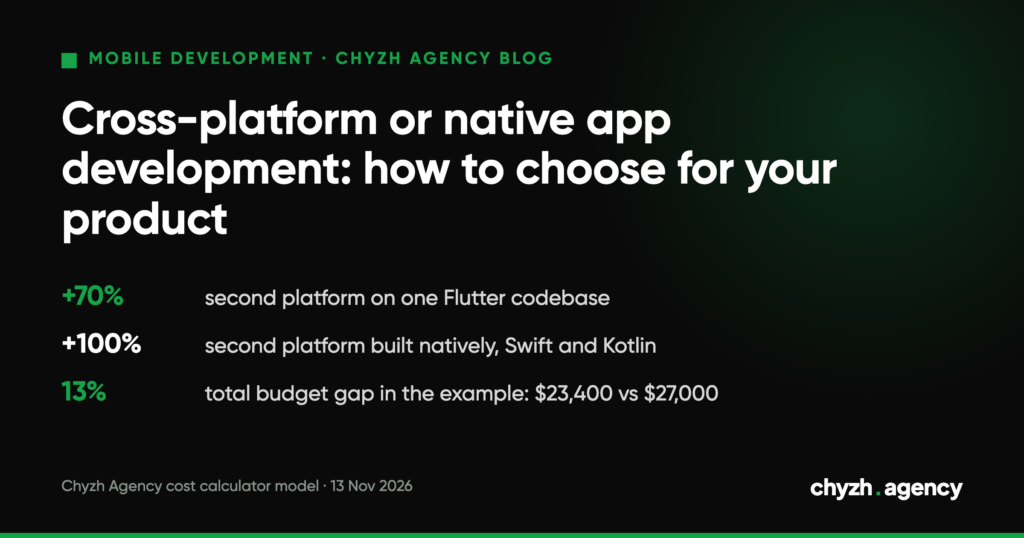
The price gap is smaller than people claim. On 13 November 2026, Google’s AI overview (Ukraine, Russian-language results) said Flutter cuts budget and time by 30–50%. In our cost calculator’s model, a second platform on Flutter adds 70% to the cost of the options, and a native one adds 100%. For the app in the example below, that’s $23,400 against $27,000, a 13% difference.
When you can decide without the matrix
You need one platform. A shared codebase only pays off when it ships to two stores. For Alchemy Markets, a trading app, the client needed only an iOS version, so we built it in Swift. A cross-platform layer would have saved nothing.
The product goes beyond Flutter’s platforms. Flutter 3.50 builds apps for Android (API 24–37), iOS (15–27), web, Windows, macOS and Linux (Flutter docs, updated 11 November 2026). Apple Watch isn’t on that list. A home screen widget in a Flutter app is drawn natively too: Google’s codelab says you can’t draw a widget’s UI with Flutter and builds it in SwiftUI or Jetpack Compose instead.
You already have a native app. You don’t have to rewrite it from scratch to use Flutter. Flutter can be embedded in an existing app as a module and used only for new screens (add-to-app).
The decision matrix: hardware, background work, team, upkeep
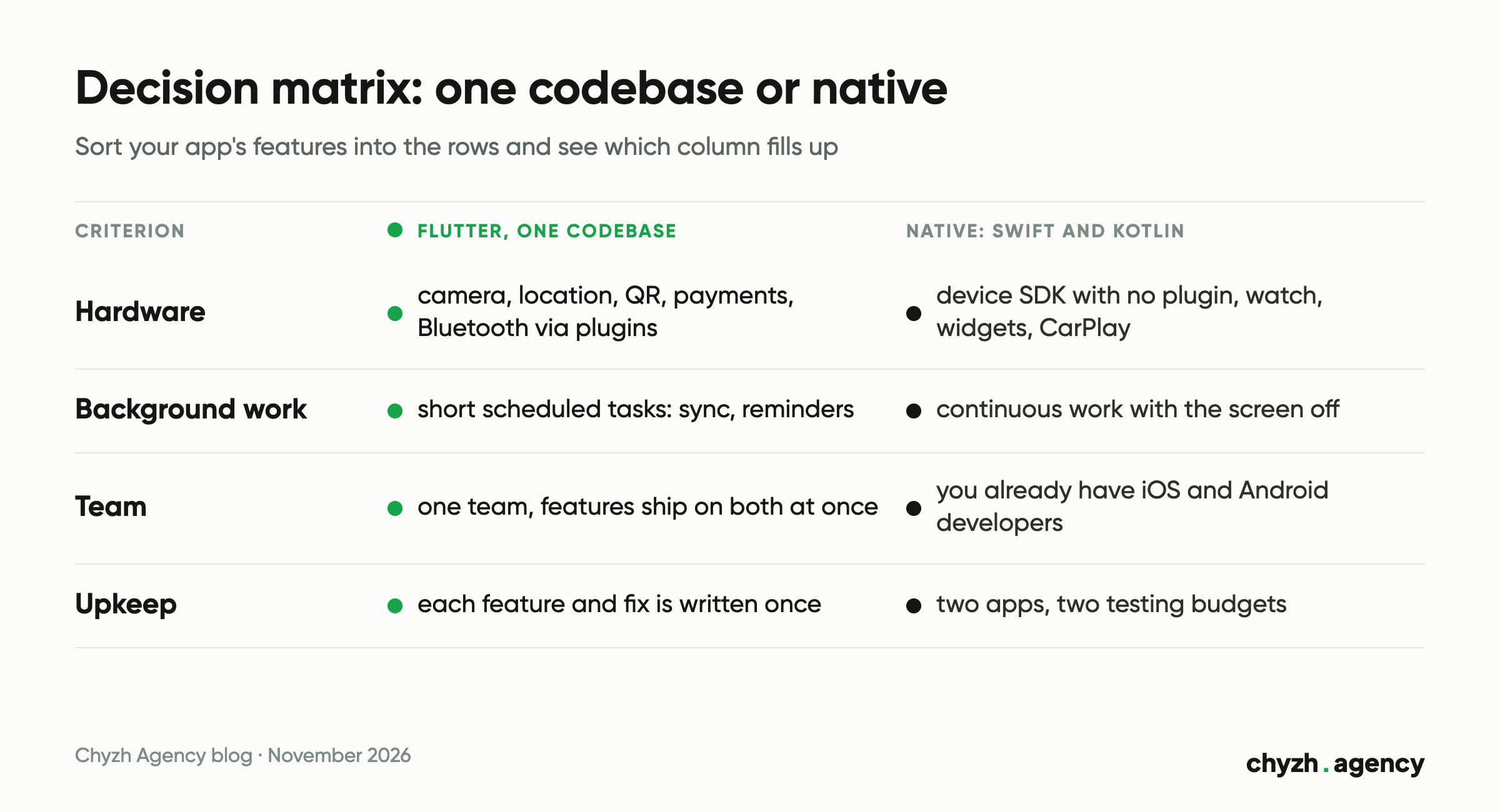
If none of the three cases above fits, go through four criteria. Put your app’s features into the rows and see which column fills up.
| Criterion | Flutter fits if | Native fits better if | What to check |
|---|---|---|---|
| Hardware and system features | camera, location, QR codes, payments, notifications and Bluetooth work through existing plugins | the product depends on a device maker’s SDK with no plugin, on a watch, CarPlay or widgets | is there a maintained plugin for each feature on both OSes |
| Background work | background tasks are short and scheduled: sync, reminders, geofences | the app runs constantly with the screen off: continuous tracking, data exchange with a device | what the app does while the phone is in a pocket, and for how long |
| Team | one team runs both versions and features ship at the same time | you already have iOS and Android developers, or separate teams per OS | who will maintain the code a year from now |
| Long-term upkeep | each feature and fix is written once | the platforms move at different speeds and get features separately | how many lines the support budget has: one or two |
Hardware brings the fewest surprises: most device features work in Flutter through plugins. Where there’s no plugin, Flutter talks to the system through platform channels, and that code is written in Kotlin or Java for Android and in Swift or Objective-C for iOS (Flutter docs, updated 7 November 2026). So hardware access alone doesn’t rule out a shared codebase. Svist, an e-scooter sharing app, unlocks scooters over Bluetooth Low Energy and is still cross-platform, built with React Native.
Each such bridge is written separately for Android and for iOS, so the more of them a project has, the less the shared code saves. Ask your contractor how many bridges your app will need before you pick the stack.
Background work is harder. Flutter runs background code in isolates, and the WorkManager plugin keeps tasks scheduled even after the phone restarts (Flutter docs, updated 29 July 2026). That’s enough for sync or reminders. If the heart of your product is continuous work with the screen off, such as nonstop GPS tracking or Bluetooth exchange with a device, ask your contractor which part will be written as native code for each OS and whether going native from the start would cost less.
Then there’s the team. Since 2019 Google has developed Android as Kotlin-first, recommends starting new apps in Kotlin, and Jetpack Compose works only with Kotlin (Android Developers, updated 22 September 2026). Native Android can still be Java, like the Android client of Qela. What matters more to you as the client: native on two OSes means two developers and two task queues. Nubank moved to Flutter because it couldn’t find enough native specialists, and its iOS and Android teams shipped features at different times (Flutter showcase, 2021).
Upkeep costs money either way, because every new iOS and Android release needs updates. In Flutter you update the SDK and plugins, sometimes waiting for a plugin’s author to catch up. Natively you update two apps. Google Pay estimated that a feature for both platforms took about 1.2 times the work in Flutter against double the work natively, and its codebase shrank from 1.7 to 1.1 million lines after the rewrite (Flutter showcase, 2021). That team had nearly 180 engineers, so for a small app the figure needs recalculating.
What a second platform costs: a worked example in our calculator
Our app cost calculator works like this: a $3,000 base plus the price of each option you pick, with the platform multiplying the options total. One platform is ×1.0, both on Flutter ×1.7, native iOS and Android ×2.0. The base isn’t multiplied. It’s our model for a ballpark figure; we write the actual quote after going through the brief.
A hypothetical example: a service booking app with a catalog and online payments. Option prices taken from the calculator on 13 November 2026.
| Option | Price |
|---|---|
| Medium size, 10–25 screens | $2,000 |
| Custom design for your brand | $2,000 |
| Sign-in, push notifications, geolocation with maps | $1,500 |
| Online payments, catalog with filters | $2,000 |
| Backend with REST API | $2,500 |
| Web admin panel | $2,000 |
| Options total | $12,000 |
| Platform | Calculation | Total |
|---|---|---|
| One, iOS or Android | 3,000 + 12,000 × 1.0 | $15,000 |
| Both on Flutter | 3,000 + 12,000 × 1.7 | $23,400 |
| Both native | 3,000 + 12,000 × 2.0 | $27,000 |
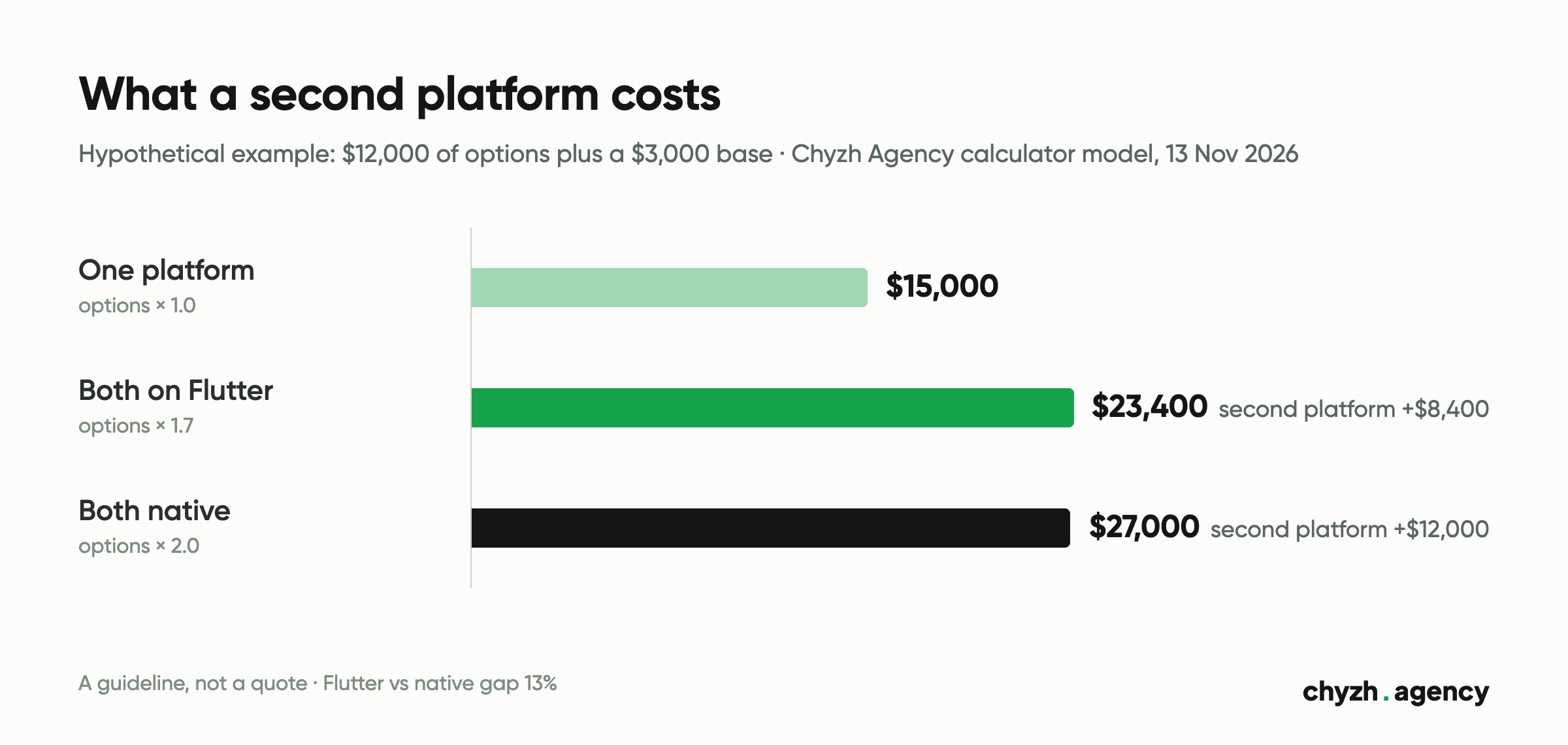
A second platform adds $8,400 on Flutter and $12,000 natively. On the second platform alone, a shared codebase saves 30%. On the whole budget the gap is $3,600, or 13%. Within the calculator it never goes above 14.4%, even with every option selected: $63,350 on Flutter against $74,000 native. Our model doesn’t produce a “30–50% budget saving”.
Limits of this calculation. The multiplier applies to every option, including the backend and admin panel. Both apps can run on one backend and one admin panel, so ask your contractor how a quote for two platforms counts those lines. The calculator doesn’t cover years of maintenance, which is exactly where the gap between one codebase and two adds up. How to put together the feature list for an estimate like this is covered in how to estimate an app MVP.
An example where we didn’t choose Flutter: Qela
Qela is an app for communities: a member takes on a quest and gets the reward only once location, a QR code, a photo or an admin confirms it was done. We built two native apps, Android in Java and iOS in Swift. Two developers wrote them in parallel, each with their own task queue. The first task appeared in the tracker on 14 June 2023, and the app went live on the App Store on 16 May 2024.
The project puts numbers on what two codebases cost. The tracker holds 782 bug reports: 331 for iOS and 365 for Android. The platforms were tested separately, and most defects affected only one of them. We wrote the lesson into the case itself: budget separate testing and a separate fix budget for each platform. If you go native on two OSes, plan the same way.
For contrast, we built UkrAvit, a B2B app for the agricultural sector, in Flutter, with one codebase for Android and iOS.
What about React Native and Kotlin Multiplatform
Flutter isn’t the only way to share code. React Native apps are written in JavaScript, and that’s what Svist runs on. Google officially supports Kotlin Multiplatform for sharing business logic between Android and iOS, and the UI can be shared too through JetBrains’ Compose Multiplatform (Android Developers, updated 6 November 2026). The matrix works the same for them: the language of the shared code changes, the questions about hardware, background work, team and upkeep stay.
What to ask a developer before you pick a stack
It looks like people often pick the stack before they talk to a studio. Between 13 May and 11 November 2026, searches naming a technology showed the 18 pages of our mobile development section in Google 706 times, and almost all of them had already made the choice: “kotlin app development agency”, “swift app development agency”, “flutter development agency”, and many Russian-language searches for Swift or Kotlin development and Flutter app prices. Not one of them compares Flutter with native development. Test your choice with these questions:
- Which features on my list will need native code in a Flutter project, and who will write it?
- What does the second platform cost as a separate line in the quote?
- How will each platform be tested? We, for example, hand over test builds: an APK for Android and TestFlight for iOS.
- Who will update the app after new iOS, Android and Flutter releases, and what does that cost per year?
- What happens if a year from now we need a feature Flutter doesn’t support?
Limits of this data. These are Search Console impressions from visible queries (Search Console hides some queries), meaning how often Google showed our pages, and they aren’t the same as demand. 70% of the impressions (496) came from Russia and 17% (123) from Ukraine. These searches brought no clicks.
Next step
List your app’s features and sort them into the matrix. Then run both options, Flutter and native, through the calculator with the same set of options. If most rows land in the Flutter column, see when Flutter development fits and what the work includes. If the matrix points to one platform or to system features, you need native iOS development or Android development.
Author: Mykola Tabuchenko, Senior Mobile Developer. Reviewed by: Serhii Kolodynskyi, Head of App Development.
Sources: Flutter documentation “Supported deployment platforms” (Flutter 3.50, updated 11 November 2026), “Platform channels” (7 November 2026), “Background processes” (29 July 2026), “Add Flutter to an existing app” (31 July 2026); Google Codelabs “Adding a Home Screen widget to your Flutter app” (27 March 2026); Android Developers “Android’s Kotlin-first approach” (22 September 2026) and “Kotlin Multiplatform” (6 November 2026); Nubank (5 November 2021) and Google Pay (29 October 2021) case studies on flutter.dev/showcase; chyzh.agency cost calculator model, multipliers and prices read from the page HTML on 13 November 2026; Google Search Console for chyzh.agency, 18 pages of the mobile development section, 13 May to 11 November 2026; Google AI overview for the Russian-language query “flutter или нативная разработка”, Google Ukraine, 13 November 2026; Qela, Alchemy Markets, Svist and UkrAvit case pages on chyzh.agency, 13 November 2026.
Related articles
A checklist for accepting a test build: 5 test devices by market share, sandbox payments,...
By our calculator model, the same app costs $17,450 or $27,650 depending on what the...
Does your app need its own server and admin panel: a feature table, data schema,...